Weekly planner for iPhone and Mac

A calm plan for a productive week.

Write down everything you want to get done, rate each task from 1 to 10, and ProWeek spreads it across your week, most important first. Then each day, you just do today.

Free · Mac with macOS 26 · iPhone with iOS 26

The Week screen, with unplanned tasks and a Spread across the week button
The Today screen, listing Thursday's tasks sorted by priority
The Overview screen, showing 62% of the week done and a bar chart by day

Plan once. Then just do today.

Three steps, every week. No projects, no tags, no due times.

1

Write it all down

At the start of your week, add everything on your mind. Give each task one number: how much it matters, from 1 to 10.

2

Spread it across the week

One tap lays your tasks out evenly over your work days, with the highest priorities on the earliest days.

3

Just do today

Each morning, open ProWeek and see only today's list, sorted by what matters most. Check things off and move on.

Life happens. Your plan keeps up.

ProWeek handles the reshuffling, so you don't have to.

  • New task mid-week? It lands on your lightest remaining day.
  • Didn't finish something? It moves to your next work day on its own.
  • Plans changed? Re-plan the rest of the week in one tap.
The Week screen

A fresh start every week.

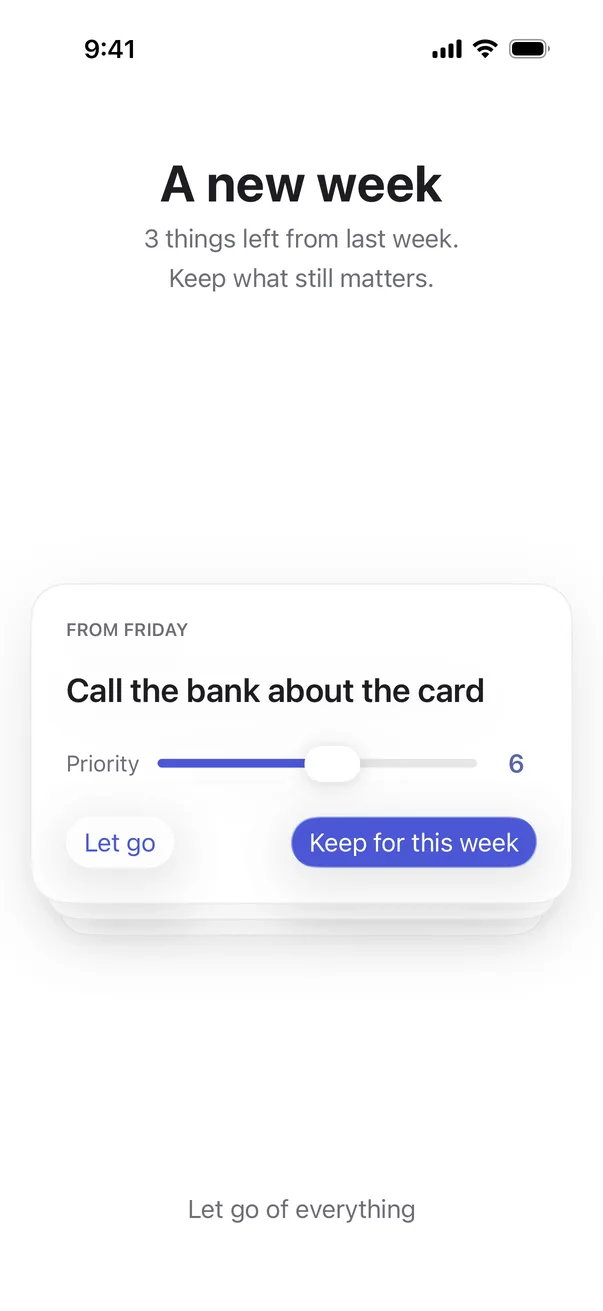
Pick the day your week resets. Anything left over comes back for a quick review.

  • Keep it, with a new priority if things have changed.
  • Or let it go, and start the week clean.
The weekly review, asking whether to keep or let go of a task from last week

See how far you've come.

Overview shows your week at a glance, without turning it into a spreadsheet.

  • How much of the week is done, and how each day went.
  • Your streak of fully finished days.
  • Look back at any past week.
The Overview screen

Thoughtful details.

Small things that make it pleasant to come back to every day.

Gentle reminders

A morning nudge to plan and an evening check-in, at times you choose.

Home Screen widget

Check off today's top tasks without opening the app.

One number for priority

Rate each task 1 to 10. Your list sorts itself by what matters most.

Light and dark

A quiet, minimal design that looks right at any hour.

Satisfying check-offs

Subtle haptics and a soft sound when you finish something. Both can be turned off.

Daily backups

A copy of your tasks is saved every day: in the Files app on iPhone, one click away in Finder on Mac.

Made for the Mac, too.

Not a stretched phone app. ProWeek on the Mac is built for the keyboard, with a menu item and a shortcut for everything.

⌘N

Quick add

Add a task from anywhere in the app. Type !8 to give it priority 8.

↑↓space

Today from the keyboard

Move through the list and check things off. Number keys set priority.

⇧⌘S

Spread the week

Lay out everything in one stroke, then drag tasks between days on the week board.

Free · macOS 26 · Notarized by Apple. Open the file and drag ProWeek to Applications.
Turn on iCloud sync in Settings to keep it in step with your iPhone.

Yours, and only yours.

No account to create. Your tasks live on your devices and, only if you turn it on, sync through your own private iCloud. Nothing about you is collected, shared or sold. The Mac app's only other connection is a daily check for a new version, which you can turn off.

No accountNo adsNo trackingNo data collected
Read the privacy policy →
ProWeek app icon

Less noise. More done.

ProWeek is available now for iPhone and Mac.